
Visual Production Workspace by FindiraLabs
SimiyaBoard
A visual workspace for game projects, asset packs, UI design, and creative production.
SimiyaBoard helps creators organize complex production work as a living visual map. Link files, folders, references, tasks, UI screens, engine workflows, package plans, notes, reviews, and milestones in one place instead of chasing them across folders, chats, spreadsheets, and engine windows.
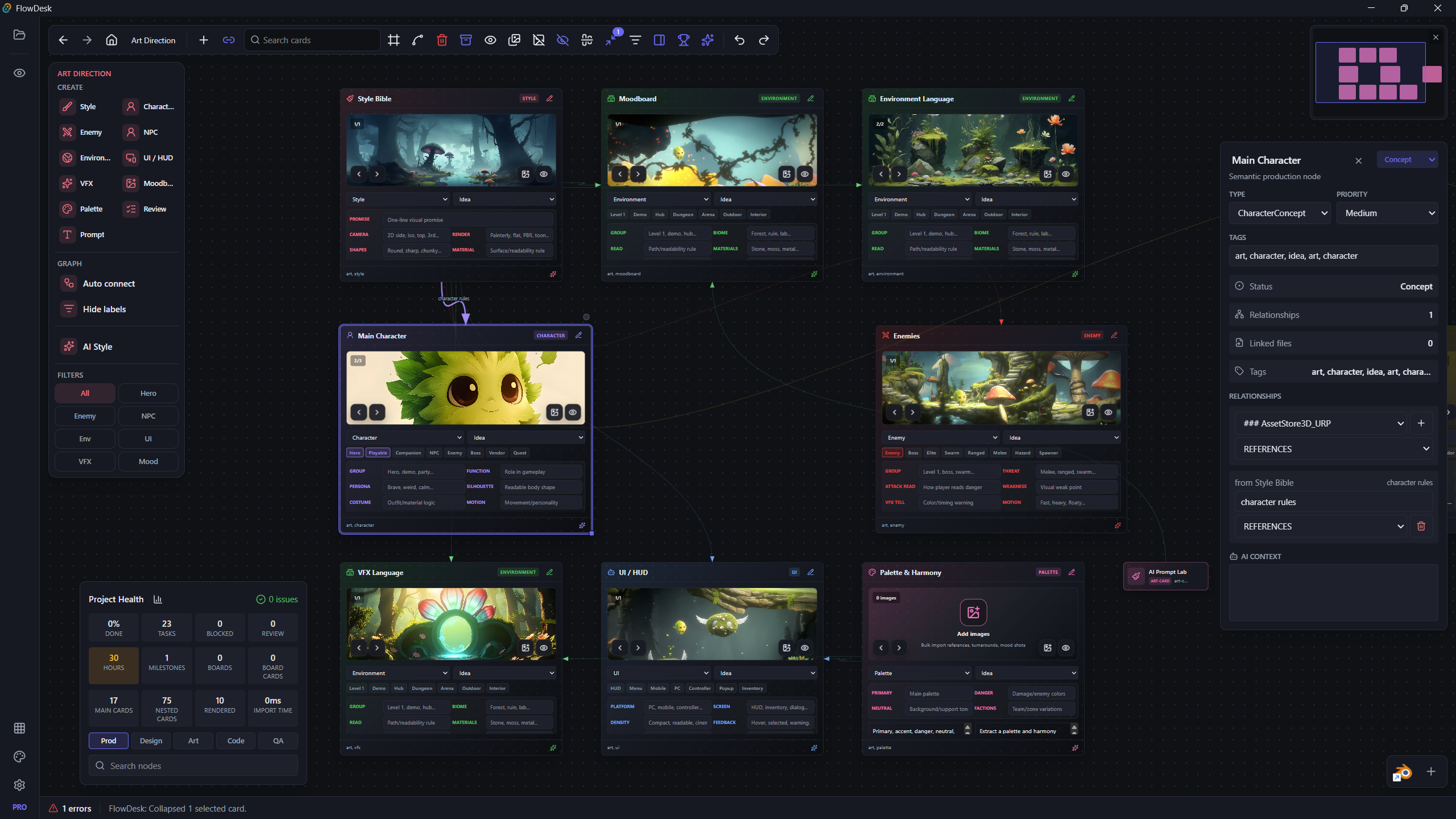
Why SimiyaBoard
Creative projects become messy fast. SimiyaBoard gives them a shape.
Game and asset production rarely lives in one tool. A single project can include Unity folders, Unreal references, Blender files, screenshots, UI mockups, publisher checklists, task notes, feedback, preview videos, and half-finished ideas. SimiyaBoard is built to make that scattered work visible and connected.
Instead of forcing every production decision into a spreadsheet or task board, SimiyaBoard lets each part of the project become a focused node. A node can be a file group, UI Builder, art direction board, publisher package, reminder, checklist, project note, browser reference, or custom production tool.
The goal is simple: keep the project understandable while it grows.
Core Features
A production desk for visual creators.
Visual Project Maps
Build a living map of your project. Arrange spaces, files, folders, tasks, notes, screenshots, milestones, references, and tools as connected nodes that make the production structure visible.
Smart Tool Nodes
SimiyaBoard nodes are not just cards. They can become focused tools for UI design, asset publishing, art direction, task planning, reference collection, file organization, and engine-side export.
UI Builder
Design game UI screens inside SimiyaBoard. Create panels, buttons, labels, bars, image placeholders, groups, masks, tabs, controls, and screen presets, then prepare structured output for Unity UI Toolkit.
Image To UI
Use a screenshot, concept mockup, or reference image as the starting point for an editable UI layout. SimiyaBoard can draft the main UI structure, then the designer can move, scale, polish, group, mask, and export.
Unity And Unreal Workflows
SimiyaBoard is being built around engine-aware workflows. Unity support is the first focus, with UI Toolkit export, bridge commands, validation reports, and package staging. Unreal support is part of the longer roadmap.
Asset Store Publishing
Plan and validate Unity Asset Store packages from multiple linked folders. SimiyaBoard can treat those folders as one package source set, check readiness, and prepare a clean staging/export plan.
Team Review
SimiyaBoard is planned for collaborative review: shared boards, comments, ownership, review status, assignments, version notes, and online workspaces for teams.
Screen Recording
Capture gameplay, UI behavior, bugs, or progress clips and attach them directly to the relevant node. The goal is to make feedback visual, local, and easy to find later.
VFX Creator
Plan effects with references, timing notes, particle layers, color direction, preview clips, and exportable VFX specs. Later versions can explore Unity VFX Graph, Particle System, and Unreal Niagara workflows.
Product Preview
One visual surface, multiple production modes.
SimiyaBoard is designed around focused workspaces. Each view keeps a different part of production organized without turning the whole app into a heavy project-management board.
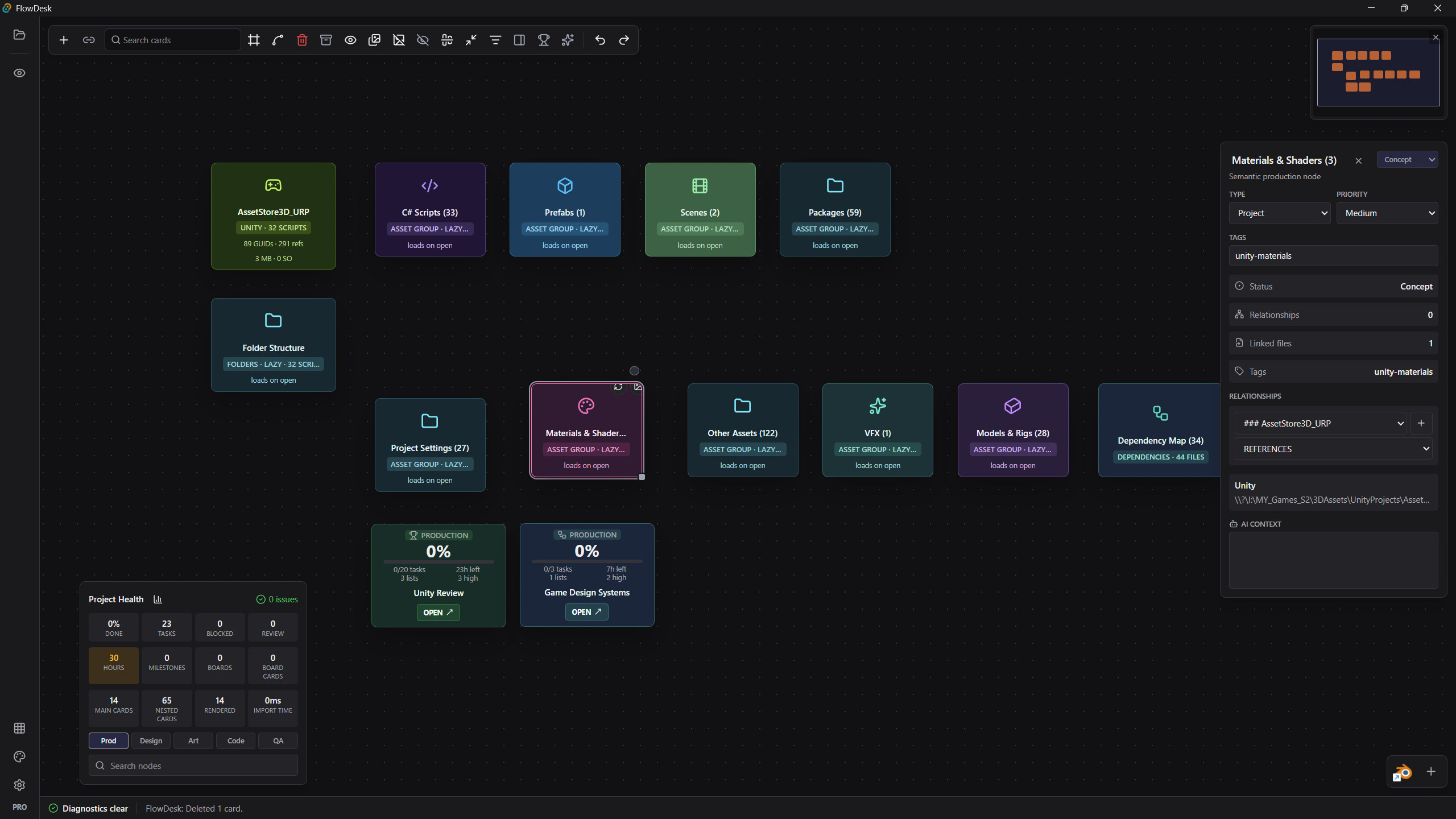
Package and dependency boards
Organize Unity folders, scripts, prefabs, scenes, package files, dependencies, and linked project assets as connected production cards. Keep inspector details and project health visible without digging through the engine every time.
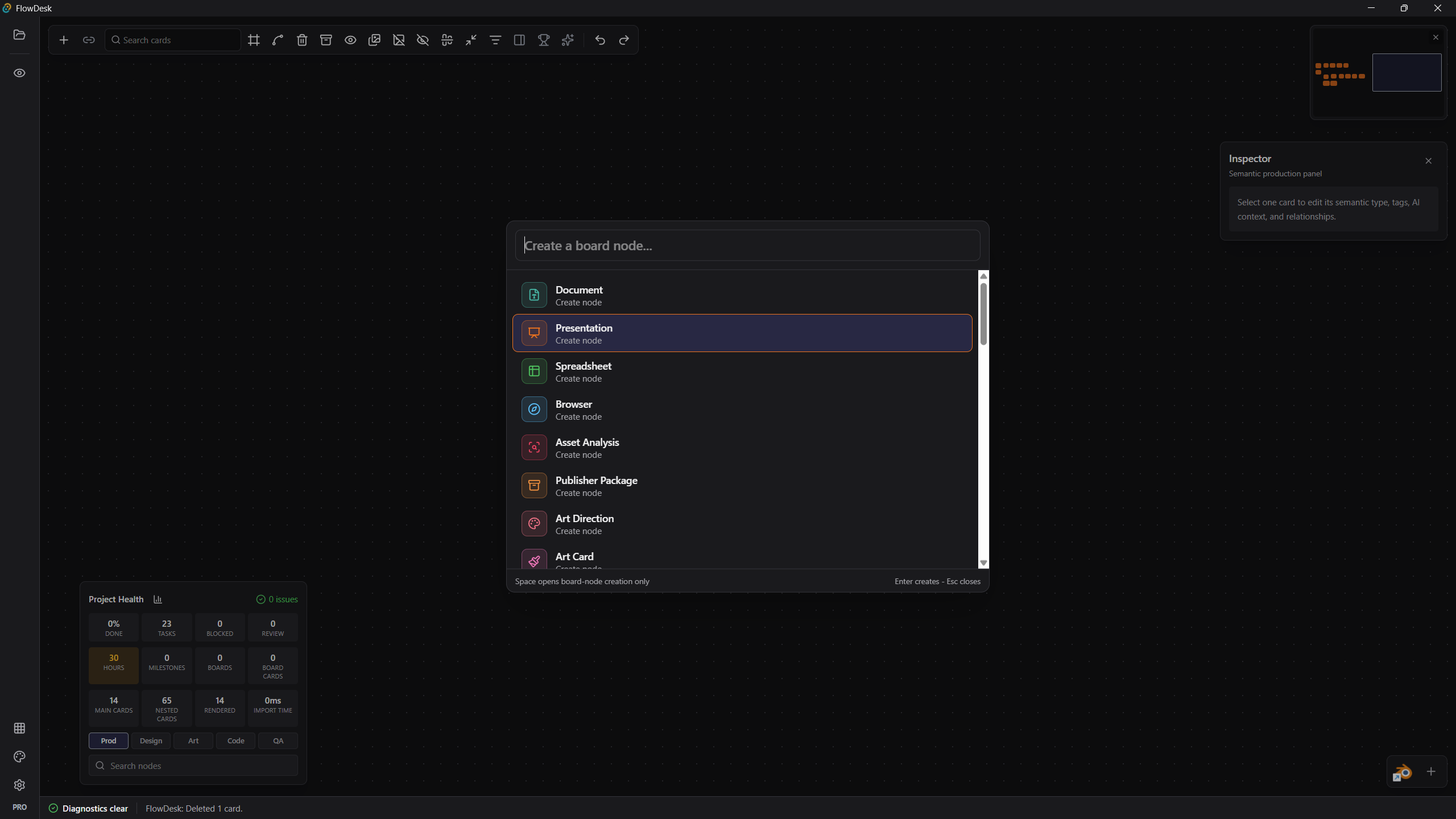
Create the right production object quickly
Add documents, task boards, asset analysis, publisher packages, art direction boards, files, images, reminders, UI tools, and custom widgets directly from the canvas.
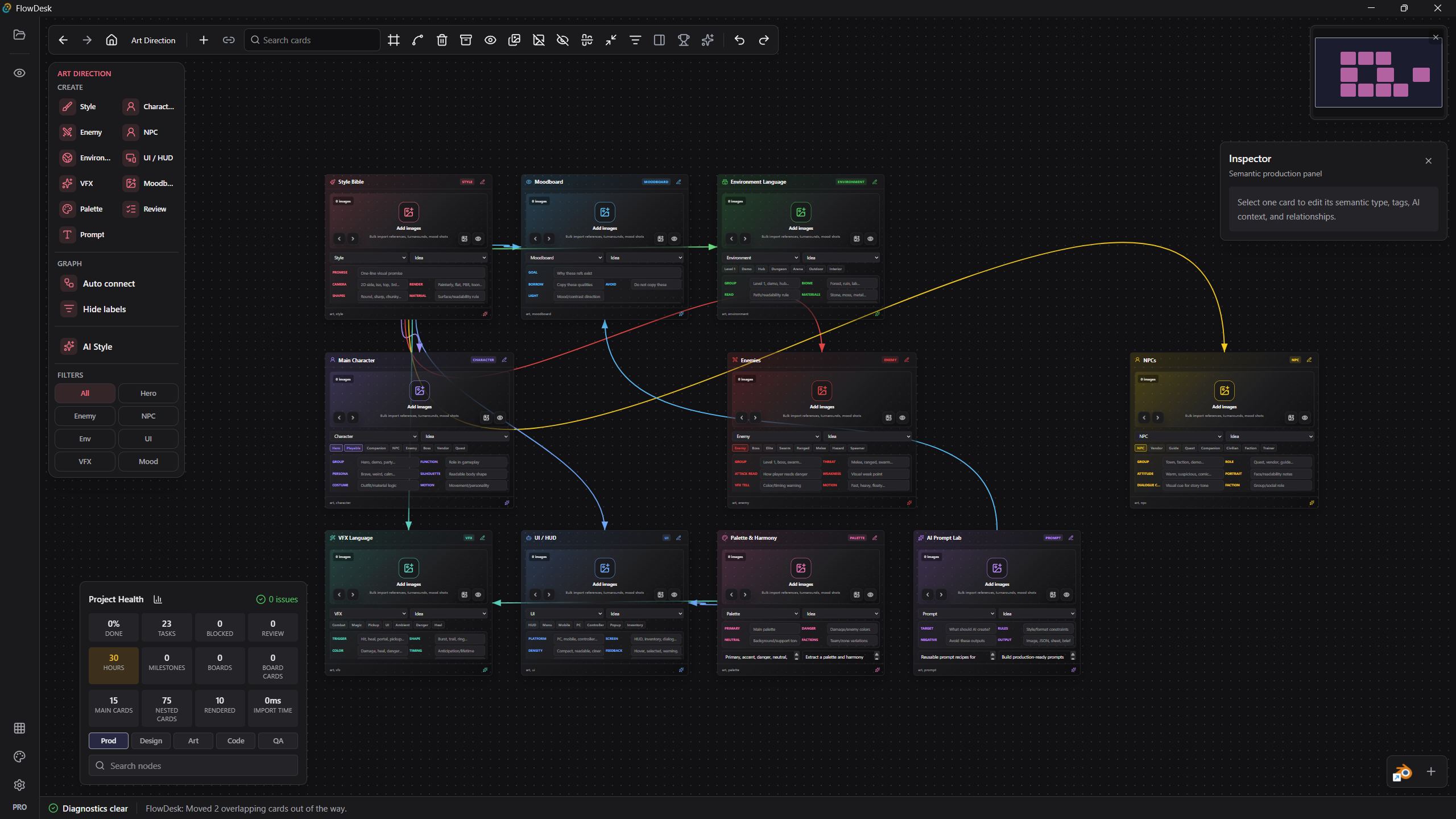
Art direction that stays connected
Keep moodboards, style rules, color palettes, character notes, VFX language, UI references, prompts, enemy ideas, NPC notes, and creative decisions in the same visual map.
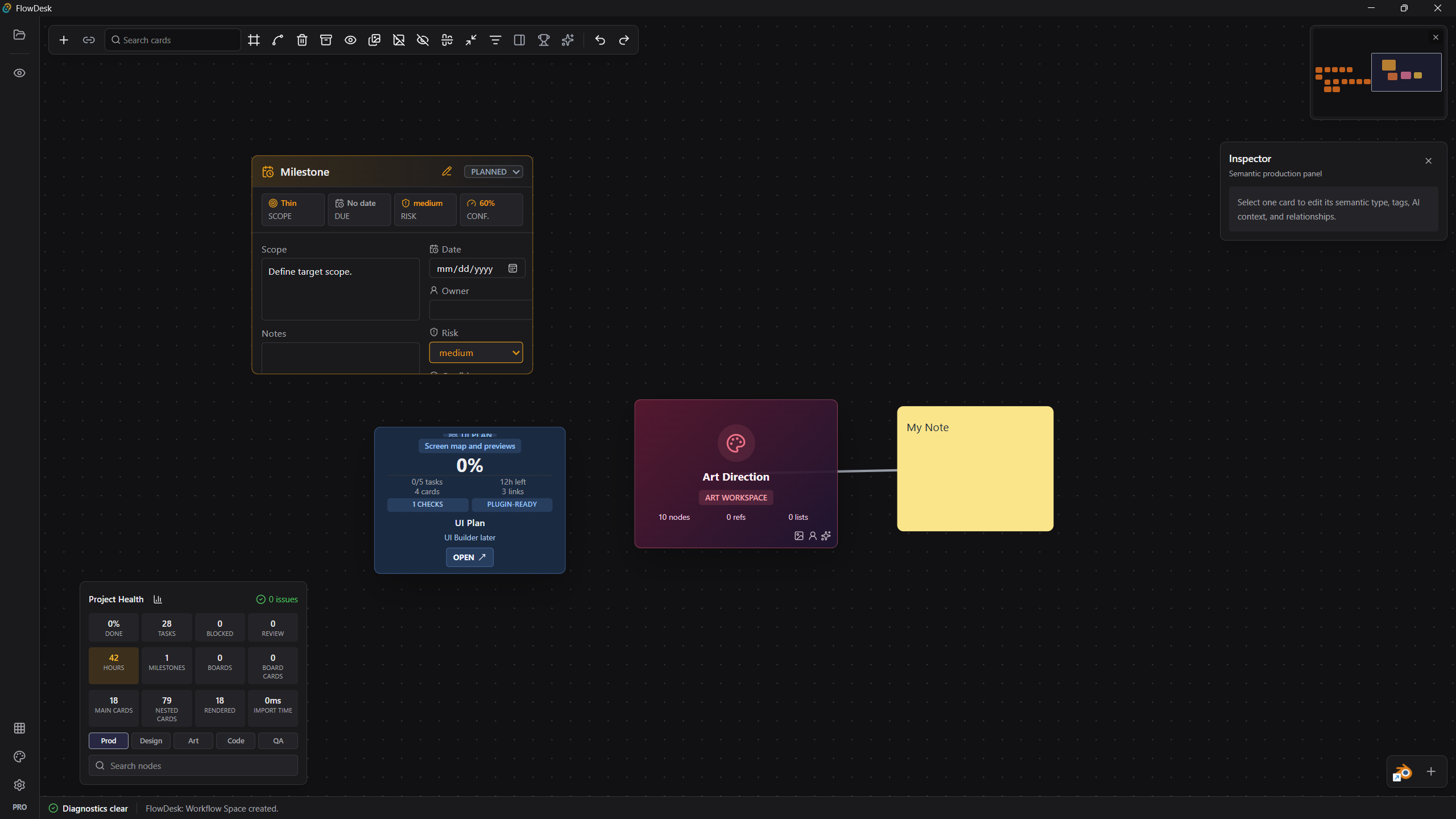
Planning without losing the creative surface
Use milestones, notes, task groups, project health, inspector details, and production context without turning the workspace into a wall of checklists.
UI Builder
From reference image to editable game UI.
The UI Builder is one of SimiyaBoard's main production tools. It gives artists and developers a canvas for designing UI screens, arranging elements, previewing layouts, and exporting structured UI data for engine workflows.
The long-term goal is a graphist-friendly workflow: drop a reference image, trace or generate the main layout, adjust everything manually, add effects and masks, test preview behavior, then export to Unity or other targets.
- Multiple screen presets and custom screen sizes.
- Panels, buttons, labels, bars, images, slots, groups, tabs, masks, and controls.
- Manual move, resize, grouping, layer ordering, and layout polish.
- Reference-image tracing for menu and HUD reconstruction.
- Macro mode for clean UI skeletons and detailed mode for deeper reconstruction.
- Preview mode for effects and transitions.
- Unity UI Toolkit export with UXML, USS, helper controller, and report files.
Engine Workflows
Designed to work beside Unity and Unreal, not fight them.
SimiyaBoard should stay explicit and safe. Engine actions should be visible, queued, cancellable, and tied to user intent. The app should help organize and prepare work before sending anything to Unity or Unreal.
- Unity firstProject linking, UI Toolkit export, generated files, bridge commands, publisher package planning, validation reports, and controlled reload/export steps.
- Unreal directionFuture project indexing, asset grouping, UMG research, screenshot review, production notes, and collaboration around Unreal projects.
- Bridge philosophyBridge commands should never feel hidden. They should be visible, reviewable, cancellable, and easy to understand.
- Safe production handoffSimiyaBoard organizes and prepares engine-side work while keeping final action tied to clear user intent.
Teamwork
Built for solo creators first, ready for teams next.
SimiyaBoard starts as a local-first desktop workspace, but the roadmap includes online teamwork for small studios, freelancers, asset teams, and collaborators.
Shared workspaces
Planned online boards, role-based review flows, comments on nodes, assignments, ownership, and optional cloud sync.
Review context
Team feedback around screenshots, UI screens, assets, recordings, version notes, review status, and activity history.
Production continuity
Collaboration should add clarity without making the local desktop workflow fragile.
Screen Recording
Capture the problem where the work already lives.
Many production issues are easier to show than explain. SimiyaBoard's planned screen recording tools will let creators capture gameplay, UI behavior, bugs, editor states, or progress clips and attach them directly to the related node.
- Full screen or region capture.
- Quick clips for bugs and reviews.
- Attach recordings to nodes.
- Add notes and review comments.
- Export or share clips.
- Later: convert recordings into visual bug reports.
VFX Creator
Plan effects before they become engine chaos.
VFX work needs references, timing, layers, color direction, motion notes, and technical constraints. SimiyaBoard's planned VFX Creator will help organize those decisions in a visual production space.
Reference boards
Collect VFX references, effect breakdowns, preview clips, color direction, and motion notes in one visual workspace.
Layer planning
Plan particle layers, timing, technical constraints, and exportable VFX specs before implementation.
Engine research
Future workflow research can explore Unity VFX Graph, Particle System, and Unreal Niagara directions.
Asset Store Tools
Prepare asset packages without turning the project into a checklist wall.
SimiyaBoard's Publisher Package node is planned as one focused tool for Unity Asset Store packaging. Instead of spreading one package across unrelated checklists, the node links the folders and files that belong to a package, validates them, and prepares a clean staging/export plan.
Unity's own tools should remain the validation source of truth where possible. SimiyaBoard should organize, stage, report, and make the process easier to control.
- Missing
.metafiles. - Broken GUID or reference links.
- Dependencies outside selected package folders.
- Duplicate or foreign package leakage.
- Editor scripts in correct
Editorfolders. - Demo scenes, readme, documentation, changelog, and license.
- Large file and media warnings.
- Unsupported folders such as
Library,Temp, andUserSettings. - Unity Asset Store readiness checks.
Roadmap
Where SimiyaBoard is going.
SimiyaBoard is in active development. The roadmap below shows the direction of the product, not a locked release promise.
Phase 1: Foundation
Stable desktop workspace, visual node canvas, file and folder linking, asset grouping, notes, task boards, reminders, project health, save protection, and manual updates.
Phase 2: UI Builder
Game UI canvas, UI element toolbox, groups, masks, shapes, effects, preview, reference image to UI draft, Unity UI Toolkit export, reports, and cleaner responsive output.
Phase 3: Unity Tools
Unity bridge command queue, safer reload/export actions, Publisher Package node, Asset Store package validation, source-set staging, and Unity project diagnostics.
Phase 4: Collaboration
Online workspaces, shared boards, comments, review states, assignments, screen recording, node-attached feedback clips, and activity history.
Phase 5: Creative Expansion
VFX Creator, more visual design tools, better screenshot-to-UI workflows, Unreal project support research, UMG export experiments, and plugin-style workflow modules.
Coming Soon
SimiyaBoard is being built for creators who need one place to see the whole project.
Follow development as the workspace grows from local production maps into UI design, engine bridges, team review, screen recording, VFX planning, and online collaboration.
Join The Update List